Picking the best Mercedes OBD2 scanner is tough because most generic code readers only do the basics—and many Mercedes “maintenance” actions won’t be available unless the scanner supports the right Mercedes communication and service modes. In practice, DIYers often end up clearing codes only to see the same warning come back right after the repair, because relearns or reset routines weren’t actually completed. Others also get stuck with apps that look promising but don’t fully communicate with the control modules they need. In this roundup, I compare five popular scanners that are marketed for Mercedes diagnostics, with extra attention on resets, live data, module coverage, and day-to-day usability when troubleshooting a real car.
For a Mercedes OBD2 scanner to be worth buying, it needs more than “read and clear.” I’d shortlist tools that can stream live data, show freeze frames, and help with VIN recognition so you spend less time guessing and more time diagnosing. If you’re doing common service work, the reset and relearn side matters—think oil service, battery registration, EPB, SAS, ABS-related functions, and related adaptations. I also look at whether a scanner supports bidirectional testing or higher-level modes, because that can change how quickly you confirm what’s actually wrong. Finally, long-term value counts: lifetime updates or no-subscription policies can make a difference when you’ll still be using the scanner on future jobs and newer model years.
⚡ Quick Verdict
Our Top Picks at a Glance
| Image | Product | Score | Link |
|---|---|---|---|
 |
OBDMATE OBD2 Scanner for Mercedes Benz, OM807 Full System Di 🏆 Editor’s Pick |
8.8/10 |
View on Amazon Free Shipping & 30-Day Returns |
 |
BlueDriver Pro Next Gen OBD2 Scanner – No Subscription, Blue 🥈 Runner-Up |
8.1/10 |
View on Amazon Free Shipping & 30-Day Returns |
 |
KINGBOLEN SOLOSCAN Bluetooth OBD2 Scanner for Mercedes-Benz | 7.6/10 |
View on Amazon Free Shipping & 30-Day Returns |
 |
FOXWELL Car Scanner NT604 Elite OBD2 Scanner ABS SRS Transmi | 7.1/10 |
View on Amazon Free Shipping & 30-Day Returns |
 |
FOXWELL NT301 OBD2 Scanner Live Data Professional Mechanic O 💵 Budget Pick |
6.4/10 |
View on Amazon Free Shipping & 30-Day Returns |
📋 How We Evaluated
Evaluation prioritized Mercedes-focused capabilities, including module coverage, reset support, and whether the device can read and clear faults reliably. Performance and usability were judged through features like live data, VIN recognition, and report quality. Value assessment considered update policy, subscription requirements, and likely suitability for DIY owners versus broader use cases.
Detailed Reviews
OBDMATE OBD2 Scanner for Mercedes Benz, OM807 Full System Di🏆 Editor’s Pick
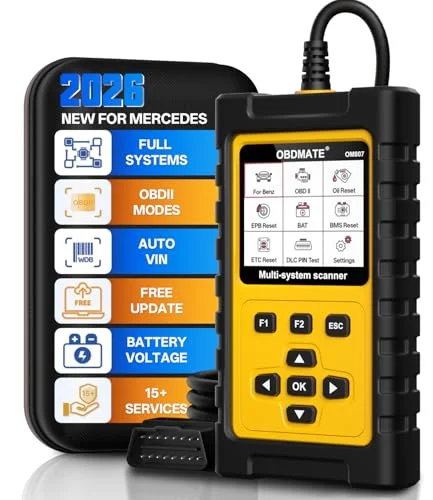
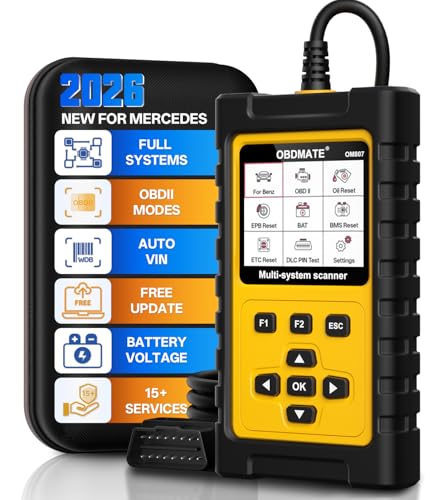
| Mercedes reset services | Oil reset, EPB reset, SAS reset, ABS bleeding, battery register, DPF regeneration (availability varies by model year) |
| Core OBDII functions | Read and erase fault codes, live data and freeze-frame viewing, I/M readiness |
| Vehicle identification | Auto VIN recognition |
| Software updates | Lifetime free updates, WiFi/USB upgrade support |
What We Found
OBDMATE’s OM807 is built specifically for Mercedes-Benz OBDII users who want more than plain trouble-code access. It targets Mercedes systems like ABS, SRS, engine, and transmission, with the usual OBD2 features included: read and erase fault codes, view live data, and display VIN information. The feature that stands out is the Mercedes-focused reset set—this listing includes items such as oil reset, EPB reset, ABS bleeding, SAS reset, throttle adaptation, battery register, and DPF regeneration. It also lists additional adaptations like TCM adaptation, injector code, TPMS reset, and adblue reset, with a note that availability can vary by vehicle year/model. It uses a 2.8-inch HD color screen for on-device viewing, which helps if you don’t want a phone-only workflow, and it also emphasizes lifetime free software updates to limit ongoing cost risk.
Who It’s For
I’d point this to Mercedes owners who want dealership-style maintenance resets without repeatedly paying for services just to get the system “finished.” It’s a good fit for DIYers who regularly handle battery registration, brake service routines, sensor relearns, and similar jobs. It also works as a universal OBD2 scanner for many post-1996 gas vehicles, which is useful if you’ve got more than one car in the household. My read is that the OM807 makes the most sense when Mercedes-specific reset access is your priority—not just clearing the check engine light.
✅ Pros
- Mercedes-focused reset services cover many common service needs like EPB, SAS, throttle adaptation, and battery registration.
- On-device 2.8-inch HD screen supports fast live data review without relying on a phone app.
- Lifetime free update messaging helps protect value by adding support for newer models over time.
❌ Cons
- Reset availability varies by vehicle year, make, and model, so some functions may not appear on every Mercedes.
- No price or rating data limits confidence in real-world reliability compared with better-reviewed competitors.
💬 Our Take
OM807 is the most complete option in this list for Mercedes owners who care about resets as much as diagnostics. It’s the pick here because the Mercedes reset coverage is extensive, and it’s paired with lifetime updates to keep long-term costs more predictable.
BlueDriver Pro Next Gen OBD2 Scanner – No Subscription, Blue🥈 Runner-Up
| Enhanced diagnostics | ABS, SRS, Airbag, TPMS, Transmission (on supported vehicles) |
| Repair guidance | Unlimited technician-verified repair reports matched to VIN |
| Live data and test modes | Live data as you drive, freeze frames, smog readiness, Mode 6 support |
| Update model | No subscription required |
What We Found
BlueDriver Pro Next Gen leans into a phone-based diagnostic workflow while still aiming to go beyond basic DTC reading. It supports reading and clearing trouble codes and lists enhanced diagnostics for systems such as Check Engine, ABS, SRS, Airbag, TPMS, and Transmission on supported vehicles (including expanded coverage on newer model years). What I’d call out is the “technician-verified repair reports” feature matched to your VIN, which is intended to provide definitions, causes, and confirmed fixes—not just code text. It also includes real-time live data as you drive, freeze-frame viewing, and smog readiness checks. On top of that, it highlights Mode 6 test support for more emissions-focused troubleshooting. The listing emphasizes no subscription, which matters if you plan to keep using the scanner over time.
Who It’s For
This one fits owners who want scan results explained in a more repair-oriented way, rather than stopping at a list of codes. It’s also a strong match if you’re comfortable using a smartphone for diagnostics and for monitoring live data while you troubleshoot. Because it’s positioned for broader coverage across mainstream brands (including Mercedes-Benz), it can work well for multi-brand households. I’d treat it as the best alternative here when VIN-matched repair context and enhanced diagnostics matter more than Mercedes-specific reset depth.
✅ Pros
- VIN-matched repair reports reduce guesswork after reading codes and clearing DTCs.
- Live data and freeze-frame access help pinpoint intermittent faults during real driving.
- Broad enhanced coverage across popular brands supports use beyond Mercedes.
❌ Cons
- Phone-based operation can feel less convenient for users who prefer stand-alone device screens.
- Reset services and bidirectional actions are not highlighted as primary features, which may limit Mercedes maintenance workflows.
💬 Our Take
BlueDriver Pro Next Gen shines at turning scan findings into guidance you can act on. If you’d rather have clearer meaning and enhanced diagnostic modes than a heavy Mercedes reset catalog, it’s the better pick.
KINGBOLEN SOLOSCAN Bluetooth OBD2 Scanner for Mercedes-Benz
| Bidirectional testing | Action tests for component activation (activation commands sent to ECUs) |
| Mercedes reset services | ABS bleeding, SAS reset, battery registration, oil reset, EPB reset, and more (varies by model) |
| Reporting | PDF report sharing via email |
| Software policy | Lifetime software updates with no subscription |
What We Found
KINGBOLEN’s Soloscan is marketed as an all-in-one Mercedes (and Maybach) bidirectional tool that pairs “all system diagnose” claims with reset coverage and lifetime updates for iOS and Android. The listing says it can read and clear codes from major control modules including engine, ABS, SRS airbags, and transmission. It also highlights advanced capabilities like component calibration, modifications, and module customization, plus PDF report sharing by email. On maintenance support, it lists multiple Mercedes-relevant functions such as ABS bleeding, SAS reset, battery registration, oil reset, crankshaft sensor relearn, EPB reset, throttle speed relearn, and transmission adaptation. The big differentiator is the bidirectional testing claim—this is meant to let you send activation-style commands to ECUs to help verify issues beyond fault-code symptoms. Compatibility and available functions can vary by model, so the listing recommends checking before buying.
Who It’s For
I’d shortlist this for Mercedes enthusiasts and DIYers who want more than code reading—especially if you’re interested in activation/activation-style testing. It also makes sense if you do multiple service jobs and want a single tool covering a wide set of reset routines. The ability to share PDF reports could be helpful if you collaborate with a shop or share outputs in a community. My caution is compatibility: if you own a specific Mercedes generation, I’d verify that the promised bidirectional and reset functions apply to your exact vehicle before relying on it.
✅ Pros
- Bidirectional testing claims enable faster troubleshooting by verifying repairs through ECU action tests.
- Broad reset list targets common Mercedes maintenance workflows like ABS bleeding and battery registration.
- Lifetime updates and no subscription support long-term ownership value.
❌ Cons
- Compatibility for advanced resets and bidirectional actions may vary and requires pre-checking by model and year.
- No price or rating data makes it harder to compare reliability versus well-established options.
💬 Our Take
Soloscan looks most appealing for users who want activation testing plus broad Mercedes reset coverage in one package. The main risk I’d watch is whether the feature list stays consistent across different Mercedes generations and trims.
FOXWELL Car Scanner NT604 Elite OBD2 Scanner ABS SRS Transmi
| System coverage | OBDII plus ABS, SRS, transmission, and engine (diagnostic codes) |
| Live data | Live data stream with data playback and print |
| Vehicle info | AUTOVIN for V-IN and vehicle info (may not work on some vehicles) |
| Maintenance functions | No support for reset or relearn |
What We Found
FOXWELL’s NT604 Elite is aimed at more traditional OBDII diagnostics with coverage across ABS, SRS, engine, and transmission. It’s positioned as “easy to use—work out of the box,” with the latest software included, so there’s less setup friction than scanners that require extra downloads. The listing includes live data streaming and built-in DTC library support, plus data playback and the ability to print. It also mentions an AUTOVIN menu to pull up vehicle information quickly when supported, which helps avoid manual VIN entry. Importantly, it spells out limitations: it does not support maintenance functions like reset or relearn, and for SRS it can read and clear common fault codes not caused by a crash—while crash/collision data can’t be cleared. In other words, this is mainly a diagnostic reader, not a “finish the service procedure” tool.
Who It’s For
I’d recommend this to owners who mainly need to identify what’s causing warning lights across multiple systems without paying for dealer-level service features. It suits DIY troubleshooting where you find the fault first, then perform repairs and handle reset/relearn steps separately (or with a different tool). The included case also reads like a “garage use” product. Since maintenance resets and relearn tasks aren’t supported, it’s not ideal if your goal is Mercedes service routines like EPB or SAS resets.
✅ Pros
- Good balance of ABS, SRS, engine, and transmission diagnostics for day-to-day fault finding.
- Live data plus playback and print help document issues during troubleshooting.
- AUTOVIN can save time by rapidly retrieving vehicle identification.
❌ Cons
- No reset or relearn support limits usability for Mercedes maintenance tasks.
- Crash-related SRS clearing is not supported, which narrows use in severe repairs.
💬 Our Take
NT604 Elite can help you find faults, but it intentionally avoids the Mercedes-specific reset work many buyers are looking for. It’s better at the “diagnose” step than at the “complete service” step.
FOXWELL NT301 OBD2 Scanner Live Data Professional Mechanic O💵 Budget Pick
| Fault code reading/clearing | Read DTCs and clear codes (standard OBD2 workflow) |
| Live data | Graphing for sensors such as O2, fuel trims, coolant temp, RPM |
| Enhanced OBDII modes | O2 sensor test and EVAP leak monitor mode |
| System limitations | No ABS/SRS/EPB/A-C/battery or special functions |
What We Found
FOXWELL’s NT301 is a basic OBD2-focused scanner for check engine and emissions-oriented monitoring. It reads and clears DTCs, provides readiness status for smog testing, and supports live data graphing for common sensors. The listing also says you can turn off the CEL or MIL after reading and clearing codes—following typical OBD2 behavior where the code can return if the underlying issue remains. For setup convenience, it includes VIN retrieval through supported menus. It also mentions enhanced OBDII modes such as O2 sensor tests and EVAP leak monitor checks. Compatibility is framed around 1996+ gasoline cars and many 2000+ European and Asian models, with support for 12V diesel vehicles that have OBD2. The limitations are clearly stated: it doesn’t support ABS, SRS, EPB, A/C, battery systems, or any special maintenance functions, and it doesn’t support bidirectional control, calibration, or advanced reset functions.
Who It’s For
NT301 is for drivers who mainly want check engine-light diagnostics and emissions readiness checks, not full-system Mercedes module access. It fits well when you just need live data graphs to spot trends during driveway troubleshooting. It’s also a reasonable pick for a secondary vehicle where advanced Mercedes reset functions aren’t required. If your goal is Mercedes-specific resets like EPB or battery registration, I’d look elsewhere because this model explicitly doesn’t support those special functions.
✅ Pros
- Strong value for basic diagnostics, with live data graphing and emissions-related test modes.
- Supports clearing MIL/CEL and checking readiness for smog-related workflows.
- Simple compatibility framing makes it easier to verify whether OBD2 access applies.
❌ Cons
- No ABS/SRS or Mercedes maintenance functions, so it cannot complete many service resets.
- Enhanced module coverage depends on vehicle compatibility, and results may vary by model year.
💬 Our Take
NT301 is a budget-friendly entry point for emissions and check engine concerns, but it falls short of what many Mercedes owners want when they need full-system reads and service reset routines.
What to Look For Before Buying
The best Mercedes OBD2 scanner depends on what you actually need to do—not just whether it can read and clear codes. If you’re dealing with persistent warnings after repairs, reset services and Mercedes-specific relearns can be the difference between “clearing” and actually finishing the job. Live data quality helps you catch intermittent issues, and VIN recognition can make the workflow faster. I also pay attention to update policies and subscription rules, because those affect long-term value—especially as your Mercedes gets newer.
Check Match Mercedes Reset Services to Real Maintenance Needs
Match Mercedes reset services to the maintenance you’ll actually perform. I’d look for explicit Mercedes-focused resets like oil reset, EPB, SAS, battery registration, and ABS-related routines. Then I’d verify each reset is listed for your Mercedes model year (not just “Mercedes compatible” in general). If a scanner only promises generic “read and clear,” it’s usually not what you need when warning lights persist after a repair. When future service work is likely, prioritize scanners with a broader reset catalog rather than minimal OBD2 coverage.
Value Prioritize Lifetime Updates and No-Subscription Models
Long-term value usually improves with lifetime free updates and no-subscription designs. Subscription tools can quietly raise the total cost of ownership over time, particularly if you use the scanner intermittently across multiple vehicles. I’d also check how updates are delivered (WiFi vs. USB) so the scanner stays usable instead of turning into a setup headache. If the listing is vague, I’d treat it as a red flag and lean toward tools that clearly spell out the update policy.
Rating Use Amazon Rating Signals and Compatibility Clarity
Use Amazon rating signals and compatibility clarity as your reality check. Higher review activity can be a decent proxy for reliability, and clear compatibility details (especially model-year specifics) reduce returns and frustration. If rating info is limited, I’d rely more heavily on transparency: does the listing clearly describe supported systems and functions? Finally, I’d prefer scanners that encourage compatibility confirmation before purchase rather than pushing vague “works for all Mercedes” wording.
Verify Verify System Coverage Beyond Engine Codes
Verify system coverage beyond engine codes. Many Mercedes owners need ABS and SRS access, not only engine DTCs. I’d check whether the scanner explicitly supports the control modules you expect to diagnose. If bidirectional testing is listed, it’s worth confirming that it applies to your exact car—because claims don’t always translate evenly across generations. And I’d make sure live data and freeze-frame viewing are included, since those features help explain what the fault is doing when it happens.
Frequently Asked Questions
Do Mercedes-specific OBD2 scanners actually handle service resets like EPB and oil?
Many Mercedes-specific OBD2 scanners can handle service resets like EPB and oil service—but support depends on your Mercedes model year and platform. The easiest way to avoid disappointment is to choose a tool that explicitly lists the Mercedes reset functions you need, rather than relying on generic OBD2 “read and clear” features. When the reset option is supported, the scanner can perform relearns and registrations that standard code readers generally can’t. If the listing doesn’t guarantee coverage for every vehicle, I’d always confirm compatibility before buying.
What’s the difference between reading codes and bidirectional testing for Mercedes?
Reading codes shows stored DTCs in specific ECUs. Bidirectional testing goes further by sending activation commands to components, which helps confirm whether the part (or wiring) actually responds as expected. That can speed troubleshooting by separating actuator/component problems from control-side issues. The catch is that bidirectional capability varies a lot between scanners and vehicles, so compatibility verification matters.
Can a scanner clear the check engine light without fixing the cause?
Clearing codes removes stored DTCs and turns off the MIL temporarily in most cases. If the underlying fault is still present, the code usually comes back after driving and a readiness cycle—because the ECU detects the issue again. That’s standard OBD2 behavior, not a scanner defect. The right repair plus a test drive is what ultimately determines whether the warning returns.
Is VIN recognition important when buying a Mercedes OBD2 scanner?
VIN recognition is helpful because it reduces manual entry errors and can improve how the scanner matches results to the correct vehicle details. Some scanners use VIN to tailor diagnostics and show more relevant repair guidance. It also speeds setup when you’ve got more than one car in the household. For best results, I’d choose scanners that offer automatic VIN recognition or a reliable VIN lookup menu.
Which type of scanner suits DIY Mercedes owners most: Bluetooth phone or handheld screen?
Bluetooth phone scanners work well when the app menus are clear and the diagnostic guidance is easy to follow. Handheld units with built-in screens can be faster for repeat garage checks because you’re not relying on phone setup or pairing. Screen-based tools can also be easier if you don’t want to mount a phone in the car. Ultimately, the best choice comes down to how comfortable you are with mobile apps and how quickly you need to navigate menus.
🎯 Final Verdict
If your main priority is maintenance resets and deeper Mercedes service workflows, the OBDMATE OM807 is the strongest choice here. Its standout advantage is Mercedes-focused reset services—things like EPB, SAS, battery registration, ABS bleeding, and DPF regeneration—paired with lifetime free updates. It’s the most complete option in this list for finishing repairs, not just diagnosing what’s wrong. I’d choose BlueDriver Pro Next Gen instead if you care more about VIN-matched repair reports and enhanced live diagnostics than having a heavy Mercedes reset menu. For most buyers, though, I’d start with OM807 for service coverage and then confirm the function list matches your exact model year before purchasing.